Crypto Wallets Explained: Hot vs Cold Storage for Beginners
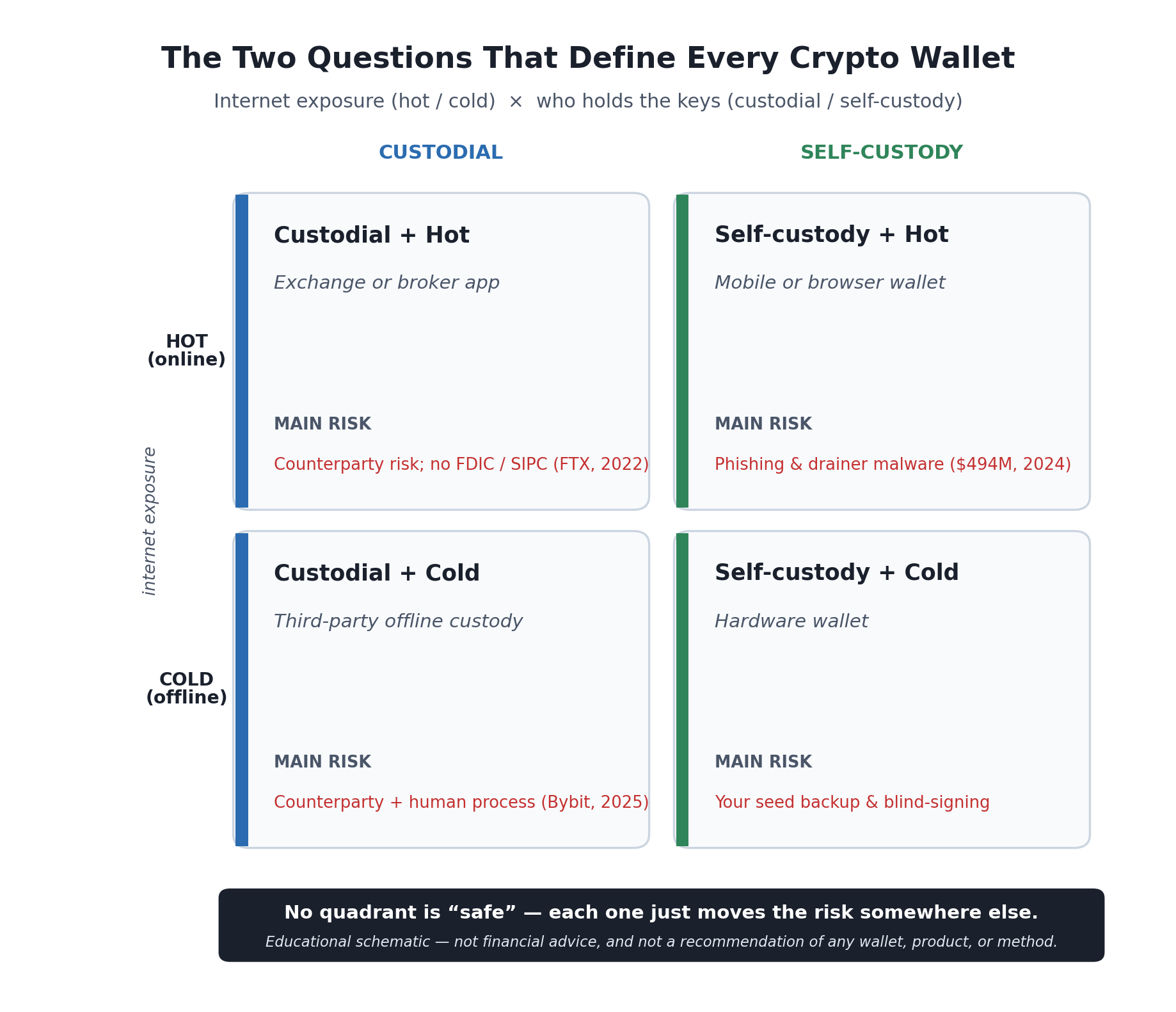
Every “which wallet should I use” question is really two separate questions: is the wallet online or offline, and do you hold the keys or does someone else? The answers trade different risks — none of them removes risk.
If you’ve read the pillar on buying your first Bitcoin safely, you’ve met the idea that the single most important safety decision in crypto isn’t which coin — it’s who holds the keys. This article is the closer look that pillar promised: what a “wallet” actually is, the difference between hot and cold storage, the difference between custodial and self-custody, and — the part most beginner guides skip — the specific ways people lose money at each point on that map, so you can recognize the failure mode before it happens to you.
One thing up front, because it shapes everything below: moving crypto is usually irreversible, and mistakes with wallets and keys generally can’t be undone by a support line, a chargeback, or a court. That’s not a reason to be scared off; it’s the reason to understand the mechanics before you’re holding an amount that would hurt to lose. This is educational content, not advice, and it does not tell you to hold crypto, in what amount, or in which product.
What a Wallet Actually Is (It Doesn’t Hold Your Coins)
Here’s the mental model that fixes most beginner confusion: a crypto wallet does not store your coins. Your coins are entries on a public ledger — the blockchain — that lives on thousands of computers, not inside your phone. What a wallet actually stores and manages is your keys: a private key that proves ownership and authorizes spending, and a public address derived from it that others use to send you funds [source: general public-key cryptography as applied to crypto wallets; see e.g. StoneX and BitGo wallet explainers, 2025].
Two consequences follow, and they drive the rest of this guide:
- Your public address is safe to share — it’s how you receive crypto, like an account number you can hand out.
- Your private key (and the recovery phrase that can regenerate it) is the whole ballgame. Whoever controls it controls the coins. In crypto, control of the key is ownership — which is why the community repeats “not your keys, not your coins.”
So when you compare “wallets,” you’re really comparing how the keys are stored and who is responsible for them. That collapses a bewildering market of apps and devices into two simple questions.
The Two Questions That Define Every Wallet
Every wallet on earth can be placed by answering two independent questions — the two axes in the diagram above:
- Is it online or offline? A hot wallet keeps the keys on an internet-connected device; a cold wallet keeps them offline [source: BitGo, “Cold Wallet vs. Hot Wallet”; Cryptonews Academy, “Hot Wallets vs Cold Wallets,” 2025].
- Who holds the keys? A custodial wallet means a third party (usually an exchange) holds the keys for you; a non-custodial or self-custody wallet means you hold them yourself [source: BitGo custodial vs. non-custodial explainer, 2025].
These are separate axes — a wallet can be any combination. An exchange account is custodial and hot. A phone app where you control the keys is self-custody and hot. A hardware wallet is self-custody and cold. An institution holding assets in offline storage on your behalf is custodial and cold. No combination is “safe” in the abstract — each one just relocates the risk to a different place, and the rest of this article is about knowing where that place is for each one.
Hot Wallets: Convenient, and the Attack Surface
A hot wallet is any wallet whose keys live on something connected to the internet — a mobile app, a browser extension, a desktop program, or the wallet built into an exchange account. Hot wallets are built for frequent use and quick access, which makes them genuinely convenient. The trade-off is baked in: because the keys touch the internet, the internet can reach them — through malware, phishing, and fake apps [source: BitGo; Cryptonews Academy, 2025].
This is not a theoretical risk. In 2024, “wallet drainer” attacks — malware planted on phishing websites that tricks you into signing a malicious transaction — stole roughly $494 million across about 332,000 victim addresses, a 67% jump in losses over the prior year [source: Scam Sniffer, “2024 Web3 Phishing Report,” Jan. 2025, as reported by BleepingComputer and Infosecurity Magazine]. The mechanic is worth understanding because it’s counterintuitive: often the thief never sees your keys at all. Instead, a convincing-looking site gets you to approve a transaction or a token “permission” that authorizes them to move your funds later. You clicked “confirm” on something you didn’t fully read — and in crypto, that confirmation is final.
That makes hot wallets a reasonable place for a small, actively used amount you’re learning with — the crypto equivalent of the cash in your pocket — and a poor place to park a large, long-term holding. The more value sits in an always-online wallet, the more it’s worth to an attacker and the longer they have to try.
Cold Wallets and Hardware Wallets: Offline, Not Invincible
A cold wallet keeps the keys offline, out of reach of remote attackers. The most common consumer form is a hardware wallet — a small dedicated device (some look like a USB stick, others like a key fob or a card). The clever part is how it signs a transaction: the private key is generated and stored on the device and, in normal use, never leaves it. When you want to send funds, the transaction is passed to the device, signed internally on the offline chip, and only the signed transaction — not the key — is broadcast to the network [source: BitGo hardware-wallet explainer, 2025]. The key never touches the internet, which makes remote theft dramatically harder. That’s why cold storage is the usual choice for larger holdings and longer horizons.
But “offline” is not the same as “invincible,” and this is the caveat most beginner guides leave out. A hardware wallet moves the risk from the network to you and the moment you approve a transaction. Two failure modes survive the offline chip:
- The approval / “blind signing” trap. If you approve a transaction without verifying the details on the device’s own screen, an attacker who has compromised the software around the device can change where the funds actually go. This is not hypothetical: in February 2025, hackers stole about $1.5 billion from the exchange Bybit — the largest crypto theft on record — not by breaking the cryptography but by tampering with the interface the human signers were looking at, so they approved a cold-wallet transfer that quietly redirected the funds [source: reporting on the Bybit hack, Feb. 2025 — BleepingComputer, CSIS, The Hacker News]. The lesson for an individual is the same at small scale: verify the address and amount on the hardware device’s screen every time, and be suspicious of any request to sign something you can’t read.
- The physical-and-backup problem. A hardware wallet is only as safe as the recovery phrase behind it (next section) and your handling of the device itself — buy it new from the maker rather than second-hand, and never enter your recovery phrase into a website or app “to set it up.”
Cold storage is a genuine security upgrade for holdings you’re not actively trading. It just changes what you have to get right — from “don’t get hacked online” to “don’t get tricked into approving the wrong thing, and don’t lose your backup.”
Custodial vs. Self-Custody: Who Carries the Responsibility
The other axis is about responsibility. With a custodial wallet — the default when you leave crypto on an exchange — a company holds the keys for you. It’s the most beginner-friendly option: password resets exist, the interface is familiar, and you don’t have to think about seed phrases. The cost is counterparty risk: you’re trusting that company to stay solvent, honest, and secure, and — critically — crypto held on an exchange generally is not covered by FDIC or SIPC insurance, and in a bankruptcy it can be treated as the exchange’s property rather than yours [source: U.S. SEC, Division of Trading and Markets, “FAQs Relating to Crypto Asset Activities”; Coinbase Help, “How is Coinbase insured?”]. The 2022 failure of FTX, where customers who left funds on the exchange couldn’t get them back, is the case study that made “not your keys, not your coins” concrete for a generation of holders.
With a self-custody wallet, you hold the keys, so no company can freeze, lose, or gamble away your funds. In exchange, every responsibility that a custodian used to carry is now yours — backups, security, and the fact that there is no reset button and no support line if you make a mistake. Neither choice is morally “safer.” Custody trades away control to gain convenience and a familiar recovery process; self-custody trades away that safety net to gain control. For most beginners the honest answer is a progression, covered at the end of this piece — not a single correct box.
The Seed Phrase Is the Whole Game
If you self-custody, one thing outranks everything else: your recovery phrase, also called a seed phrase. It’s typically a list of 12 or 24 ordinary words that encodes your keys and can regenerate your entire wallet on any compatible device. This isn’t a random gimmick — it’s a published standard called BIP-39, which maps your wallet’s underlying secret to words drawn from a fixed list of 2,048 carefully chosen words (each word encodes 11 bits, since 2 to the 11th power is 2,048), with a built-in checksum so a mistyped phrase is usually caught [source: BIP-39 specification; Webopedia and Bitcoin Wiki “Seed phrase” explainers, 2025]. A 12-word phrase already represents on the order of 10-to-the-39th possible combinations, so the phrase’s security comes from being impossible to guess — and entirely from being impossible for anyone else to obtain.
That last point is the double edge. The recovery phrase is simultaneously your only backup and your single biggest point of failure:
- Lose it with no copy → the coins are unrecoverable. Not frozen. Gone.
- Let someone else obtain it → they can drain the wallet, from anywhere, instantly, and irreversibly.
So the rules follow directly, and they are non-negotiable:
- Write it down and store it physically offline — on paper or metal, in a safe place (ideally more than one, so a single fire or flood doesn’t erase it).
- Never type it into a website, app, or “wallet validator,” and never share it with “support.” No legitimate party will ever ask for your recovery phrase — anyone who does is running a scam.
- Never photograph it into your cloud-synced camera roll or store it in a notes app, email, or password manager that syncs online — that quietly turns your cold backup into a hot one.
There’s a moment nearly everyone who self-custodies remembers. The wallet generates the recovery phrase, you write the words down one by one, and somewhere around the sixth or seventh it lands that this scrap of paper is now the only thing standing between you and your coins — no institution behind it, no reset button, no support line to call. People commonly describe copying the words a second time just to be sure, storing the backup somewhere fireproof, and then testing the restore on a fresh wallet before moving any real amount in. That instinct is exactly the right one: treat the phrase with the seriousness the situation actually warrants, and prove your backup works before it ever has to.
Putting Numbers on “Impossible to Guess” and “Usually Caught”
The section above makes two quantitative claims in words — that the phrase is impossible to guess, and that the checksum usually catches a mistyped one. BIP-39’s structure, exactly as described above, fixes both values precisely. The first one also turns out not to be the number the article quotes.
The Headline Count Is Not the Number of Valid Seeds
Twelve words drawn from 2,048 gives 2,048 to the 12th power of combinations, which is 2 to the 132nd — and at 5.4445 times 10 to the 39th, the article’s “on the order of 10-to-the-39th” is right. But BIP-39 spends some of those bits on the checksum rather than on the secret: a 12-word phrase carries 128 bits of entropy plus 4 checksum bits, and a 24-word phrase 256 plus 8. So most word combinations are not seeds at all.
| Phrase length | Word combinations | Actual valid seeds | Only one in |
|---|---|---|---|
| 12 words | 2 to the 132nd | 2 to the 128th | 16 |
| 24 words | 2 to the 264th | 2 to the 256th | 256 |
The correction is a factor of 16, and it points the safe way — a guesser has fewer targets to hit, not more. The second row carries the more surprising fact: doubling the word count does not double the difficulty, it squares it. A 24-word phrase has 2 to the 128th times as many valid seeds as a 12-word one — and that multiplier is the entire 12-word space over again. In decimal the two are 3.4028 times 10 to the 38th and 1.1579 times 10 to the 77th.
“Usually Caught” Has an Exact Value
The checksum bits are what catch a mistyped phrase, so the number of them sets the odds exactly.
| Phrase length | Checksum bits | A wrong phrase slips through | A wrong phrase is caught |
|---|---|---|---|
| 12 words | 4 | 6.250000% | 93.750000% |
| 24 words | 8 | 0.390625% | 99.609375% |
“Usually” is 93.75% on a twelve-word phrase and 99.609% on a twenty-four-word one. The flip side is the part worth internalizing before you rely on the checksum as a safety net: 6.25% of the time a wrong twelve-word phrase is perfectly valid. It will not error. It will quietly open a different wallet, almost certainly an empty one — which looks identical to having lost your own.
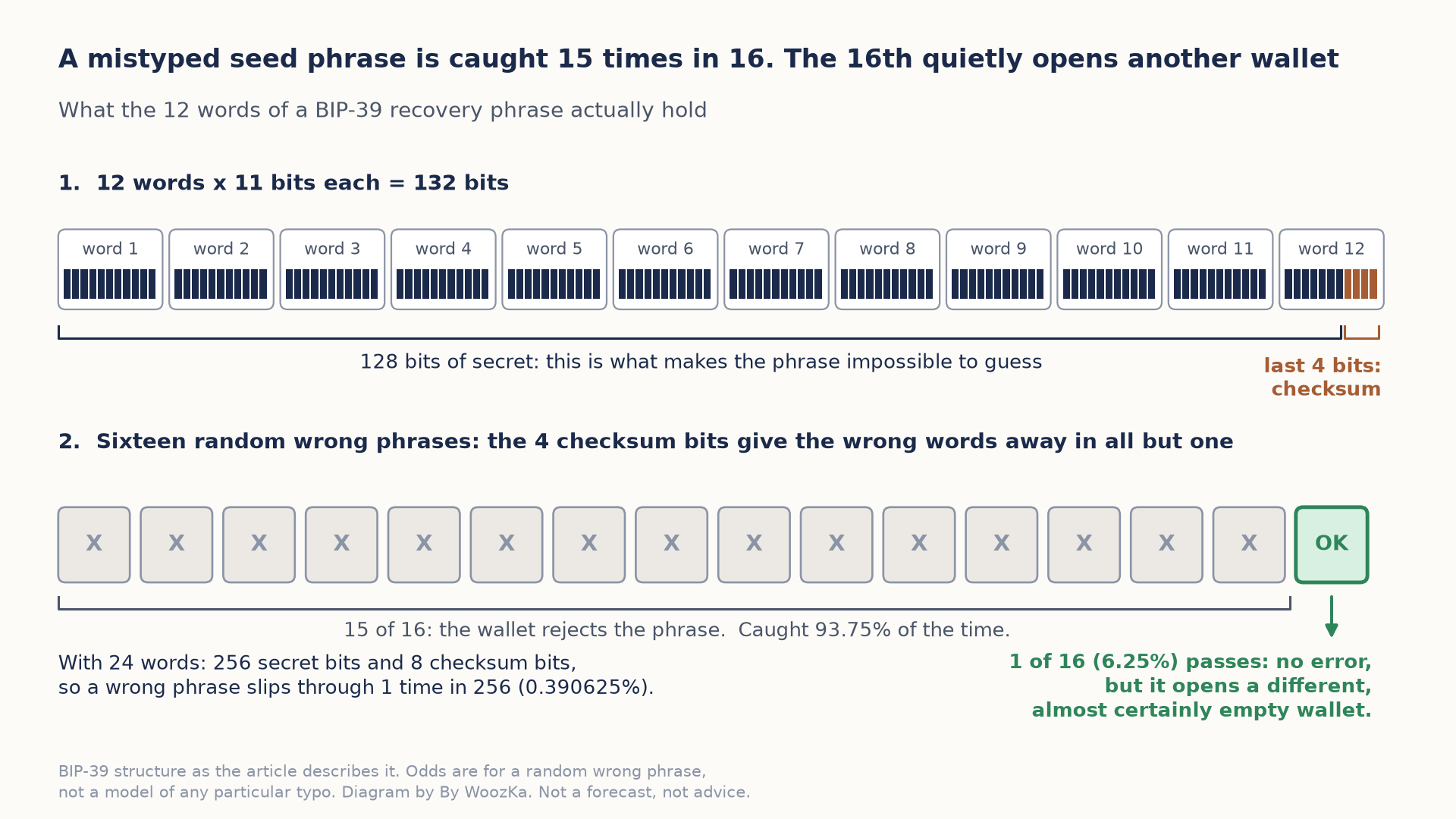
Only 128 of a 12-word phrase’s 132 bits are secret; the last 4 are a checksum, which is why a wrong phrase is rejected 15 times in 16. The 16th time it is accepted without any error and simply opens a different, almost certainly empty wallet.
Where the Money Actually Went
Set that search space against the loss figures this article reports for 2024, divided out.
| Derived from the 2024 drainer figures | Amount |
|---|---|
| Average loss per victim address | $1,488 |
| Implied prior-year losses | $295.8 million |
| Year-over-year increase | $198.2 million |
Here is the whole security model in one comparison. The valid-seed space is 2 to the 128th, about 3.4028 times 10 to the 38th. Not one of those 332,000 drained addresses was reached by searching it. Every one was reached by persuading a person to sign something or hand something over. The phrase’s strength is arithmetic; every real loss came from the part arithmetic does not protect. That is exactly why the rules above are about storage and disclosure rather than about picking a better phrase — there is no better phrase to pick, and the attacker was never going to guess anyway.
Two claims above were turned into arithmetic; here is how, and where it ends. Every input above is a figure this article already publishes — the 2,048-word list, 11 bits per word, the 12- and 24-word lengths, the checksum, the “order of 10-to-the-39th” figure, and the Scam Sniffer totals of roughly $494 million across about 332,000 addresses at a 67% year-over-year jump. Every figure was verified in code before it was published; the article’s own 10-to-the-39th was recomputed at 5.4445 times 10 to the 39th and confirmed before anything was built on it. Three limits are real. The entropy and checksum figures are BIP-39’s specification as the article describes it, not measurements of any wallet. The checksum percentages are the odds that a random wrong phrase passes, not a model of any particular typing mistake. And the loss figures are one firm’s reporting for a single year; the average is a mean over a badly skewed distribution, so most victims lost less than it. No forecast, no product recommendation and no security advice beyond what the article already gives appears above.
The Failure Modes, as Patterns (Not Just Stories)
The specific scams change monthly; the shapes don’t. Learn the patterns and you’ll recognize new variants you’ve never seen:
- Phishing sites and fake wallet apps. A login page or “wallet” app that looks exactly like the real one, built to capture your credentials or your recovery phrase. Reach wallets through your own bookmarks and download apps only from official sources; check the URL every time.
- Malicious approvals / wallet drainers. The $494-million pattern above — you’re induced to sign a transaction or token permission that hands over access. Read what you’re approving; be wary of “connect wallet and claim” offers.
- Address poisoning and clipboard swaps. Malware or a look-alike transaction history swaps in an attacker’s address that resembles one you’ve used, hoping you paste it without checking. Verify the full destination address, not just the first and last few characters.
- Blind signing. Approving anything you can’t fully read — the individual-scale version of the Bybit failure. If a hardware wallet is involved, confirm the details on the device’s own screen.
- “Support,” giveaways, and recovery services. Impersonators promising help, free coins, or to “recover” previously stolen funds. Legitimate parties never ask for your phrase, your keys, or remote access to your device.
The unifying tell: urgency, plus a too-good promise, plus a request to sign, connect, or reveal something. Slowing down defeats most of them.
A Sane Default Progression for a Beginner
None of this is a recommendation of any product or a claim about what’s right for you — it’s the general, widely taught progression, and you should confirm current best practices and any product’s specifics yourself:
- While you’re learning with a small amount, a reputable custodial exchange account (custodial + hot) is a defensible starting point — provided you harden it with a strong unique password and app-based two-factor authentication, and you understand the counterparty risk you’re accepting.
- As the amount grows and your horizon lengthens, learning self-custody — most commonly a hardware wallet (self-custody + cold) — becomes worth the added responsibility, because the counterparty risk of leaving a large balance on an exchange gets harder to justify.
- Whichever you use, the constants are the same: guard the recovery phrase offline and never digitally, verify addresses and approvals before you sign, and keep only what you’re actively using in anything hot.
The goal isn’t to reach some final “safest” wallet. It’s to always know which risks you’re carrying — and to make sure the amount at stake matches how much of that responsibility you’ve actually taken on.
Common Beginner Mistakes to Sidestep
- Thinking the wallet “holds” the coins. It holds keys. Everything else follows from that.
- Putting a large, long-term holding in a hot wallet because it’s convenient — convenience is exactly what attackers count on.
- Treating a hardware wallet as magic. It protects the key; it doesn’t protect you from approving the wrong transaction or losing your backup.
- Digitizing the seed phrase — a photo, a cloud note, a synced password manager — which silently undoes cold storage.
- Assuming an exchange is an insured bank. It usually isn’t: no FDIC, no SIPC, and FTX showed what that can mean.
- Signing things you didn’t read. In crypto, “confirm” is final.
Where to Go Next
You now understand the map: the two axes, what each quadrant protects against, and where each one leaves you exposed. To go deeper on the safety side this article opened:
- How to Buy Your First Bitcoin Safely: A Step-by-Step Guide — the pillar this piece extends, covering sizing, exchanges, real costs, and the buy itself.
- Common Crypto Scams and How to Spot Them Before You Lose Money — the fraud patterns above, in depth.
- Crypto Position Sizing: How Much of Your Portfolio Should Be Crypto? — how to think about the “how much” question without a made-up percentage.
- Best Crypto Exchanges Compared: Fees, Security, and Coin Selection — the like-for-like platform breakdown, with current fees and security history.
If you’d like the plain-English read on crypto and investing — explained, never hyped, and always risk-first — that’s what the newsletter is for. Subscribe below.
Disclaimer: This article is educational content, not financial advice. I am not a licensed financial advisor, and nothing here is a recommendation to buy or sell any security or asset. Investing and trading involve risk, including the possible loss of the money you invest. Do your own research and consider consulting a licensed financial professional before making investment decisions. Read the full Disclaimer.
Historical and backtested results are hypothetical, carry inherent limitations, and do not guarantee future results. Figures were accurate to the best of my knowledge as of this article’s last-updated date and may have changed.
